Submissions open later. You can prepare yours now. You'll have 14 days to lodge once the Department puts the plans on exhibition, which could be as early as December. Most of a submission can be drafted before then, and this page shows how.

Your submission. Your Bronte. Your voice.

How to prepare now, and lodge in the 14 days

122–128 Hewlett Street, Bronte · SSD-124072740 · Bronte Community Association Inc.

Fortis's plans for 122–128 Hewlett Street are coming. Once they're on exhibition, you'll have just 14 days to respond. You don't need to be a planning expert. Start preparing now, using your own experience of Bronte and the places you care about.

Prepare now. Be ready to submit when the exhibition opens.

This guide has two parts: Part A, what to do now (sections 1 to 7), and Part B, how to lodge once it opens (sections 8 and 9).
Part A. Prepare now

1. Your own words count

The Department must consider every issue raised in submissions "regardless of who the submitter is or the number of submissions received", and its reasons must say how submissions were taken into account. Each unique submission is counted. A copied one adds nothing new.

More

Earlier this year at Leichhardt, a project on the same fast-track pathway was cut from 16 storeys to 12 during assessment. The Department's report says why: "The project has been revised in response to concerns raised by submissions, Council and the Department." It had 24 unique public submissions.

After the exhibition closes, the Department publishes every submission and asks Fortis to prepare a report responding to the issues raised. An issue you raise has to be answered.

In the Department's words: "You do not need to be a specialist to have your say." What you see from where you live is something only you can add. Each adult in your household can make their own submission, in their own words.

2. You'll have 14 days, and they could start in early December

  1. Fortis lodges its plans (expected late this year or early next, not confirmed)
  2. the Department checks they're complete, about two weeks
  3. exhibition: 14 calendar days, weekends included
  4. submissions close.

The 14 days could fall in the weeks before Christmas, or run across the summer holidays: 20 December to 10 January doesn't count, so the clock stops and restarts. Have parts 1 to 3 drafted by the end of November.

More

Fourteen calendar days is about ten working days, to respond to plans that will run to many technical reports. That's why we're asking you to start now, not when it opens.

No date has been set, and the 14 days could fall in one of three ways. If the plans go in by late November, the 14 days could run in the first half of December. If they go in during December, the 14 days could start before Christmas, stop from 20 December to 10 January, and finish in January. If they go in later, they could start in mid-January or after. Plan for the hardest of these.

You can lodge online from anywhere, so being away over summer needn't stop you. If you'll be away, take your notes with you.

Late submissions are at the Department's discretion, so don't count on one. If the plans change after the exhibition, the Department decides whether to exhibit them again, and for how long.

You'll know it has opened from the Department's "Notify me" alert (section 7) and, if you're a BCA member, from our email the day it opens.

3. Start now: you can draft most of it before the plans are out

  1. 1

    Your connection

    Where you live, walk, swim or spend time, how you use the area, and how long you've been here.

    Draft now
  2. 2

    What could change

    What you see, how sunlight reaches you, how you experience your street or the headland. Name the place. Name the time of day or the season. Say what changes.

    Draft now
  3. 3

    Why it matters

    The impact on your home, your family, your daily life or the character of Bronte.

    Draft now
  4. 4

    Review and refine

    Your submission isn't finished until you've reviewed the plans. Find what they say about your issues, and refine your draft to respond to what is actually proposed.

    Finish in the 14 days
Collect now: photos from the places you use, noting where you stood and when · what traffic and parking are like on a busy day, with the date and time · which rooms and outdoor spaces get sun, and when.
More

Draft it in a document on your computer or phone, and keep it. When the exhibition opens, review the plans and refine your draft, then paste it into the form or upload the document.

Summer weekends, events and school times are when the streets are tested. If the traffic or parking is bad, photograph it and note the date and time.

4. Questions to answer from where you live

Pick the one or two that matter most to you, and answer them about your own place: your window, your street, your walk. You don't need to cover them all.

Height and bulk

Ask yourself
Where do you see the site from? What will you see there that you don't see now? Today's height limit on this site is 9.5 m, and the plans ask for the limits to be raised. Should they be raised here? Why, or why not?
Collect now
A photo from where you'll see it
In the 14 days, look in the plans for
The drawings, the visual impact assessment, and the rezoning report, which asks for the limits to change

The character of Bronte

Ask yourself
What makes this part of Bronte what it is? The headland, the streets, the size of the buildings. What would a nine-storey building change?
Collect now
Photos of the street and the headland as they are today
In the 14 days, look in the plans for
The design report

Precedent

Ask yourself
If this is approved, what would it make easier next time, on other sites along this coast? The Department has asked Fortis to address "the potential precedent" this could set.
In the 14 days, look in the plans for
The rezoning report

Sun and shadow

Ask yourself
Which of your rooms, your garden or the park get sun now, and when? Could a building this size take that away?
Collect now
A note of when the sun reaches the places you use
In the 14 days, look in the plans for
The shadow diagrams

Traffic, parking and getting around

Ask yourself
Which streets do you use, and what are they like on a busy day? Summer weekends, events, school times. Where would residents' visitors park? How would residents reach shops, schools and transport without a car?
Collect now
Photos on a busy day, with the date and time
In the 14 days, look in the plans for
The traffic and parking report

Views from public places

Ask yourself
Where do you walk, swim or sit? What will you see from there that you don't see now? The beach, the park, the coastal walk.
Collect now
Photos from those places, noting where you stood
In the 14 days, look in the plans for
The photomontages and the visual impact assessment

Views from your home

Ask yourself
Which view would change, and from which room? Ocean, beach, headland, horizon. A living area, a bedroom, a balcony. Standing or sitting? To the front, back or side? How much of it would go?
Collect now
Photos from each window or balcony, noting the room
In the 14 days, look in the plans for
The view analysis

Privacy

Ask yourself
Which of your windows, balconies or garden would be overlooked, and from which levels?
In the 14 days, look in the plans for
The drawings: the windows and balconies that face you

Night and construction

Ask yourself
How would light from the upper floors affect your home or the headland at night? What would construction mean for your street?
In the 14 days, look in the plans for
The construction plan, and any lighting plan

What Bronte gets in return

Ask yourself
Is what the community gains enough, for limits this much higher? The plans will say how many affordable homes there are. Fortis has said they would be run by a community housing provider for 15 years.
In the 14 days, look in the plans for
The rezoning report's case for public benefit, and the affordable housing it offers
More

The height question matters most. The plans don't only ask to build a building; they ask to raise the height and density limits for this site. So it's worth saying whether you think those limits should be raised here at all, not only what the building would look like.

These are questions to think with, not words to copy. Answer them in your own sentences, about your own place.

5. What makes a submission count

Do

  • Say at the start that you object to SSD-124072740, 122–128 Hewlett Street, Bronte
  • Use your own words
  • Be specific: the place, the time, what changes
  • Stick to what the building does: height, views, shadow, traffic, character
  • Keep it calm and factual
  • Explain one issue well rather than list ten

Avoid

  • Copying anyone's words: a form letter, a neighbour's submission, or the questions in this guide
  • Signing a petition instead of writing
  • Claims about people or their motives
More

Why your own words matter: the Department weighs issues, so a copied submission tells it nothing new. Your own words, about your own place, add something only you can.

Write about the building, not the people behind it. Claims about anyone's honesty or motives weaken a good submission, and submissions are published.

If you want to go further: the Department has set requirements the plans must meet, called the SEARs, published on the project page. One says the proposed height and floor space ratio "should be reconsidered". If your issue matches a requirement, say whether the plans meet it. This is optional: what you see from where you live is what only you can add.

6. Your submission will be published

The Department publishes your name, your suburb and your whole submission, with any photos or documents attached, and Fortis must answer the issues it raises. To keep your name off it, answer Yes when the form asks whether to withhold your name, and leave your name, address and contact details out of what you write.
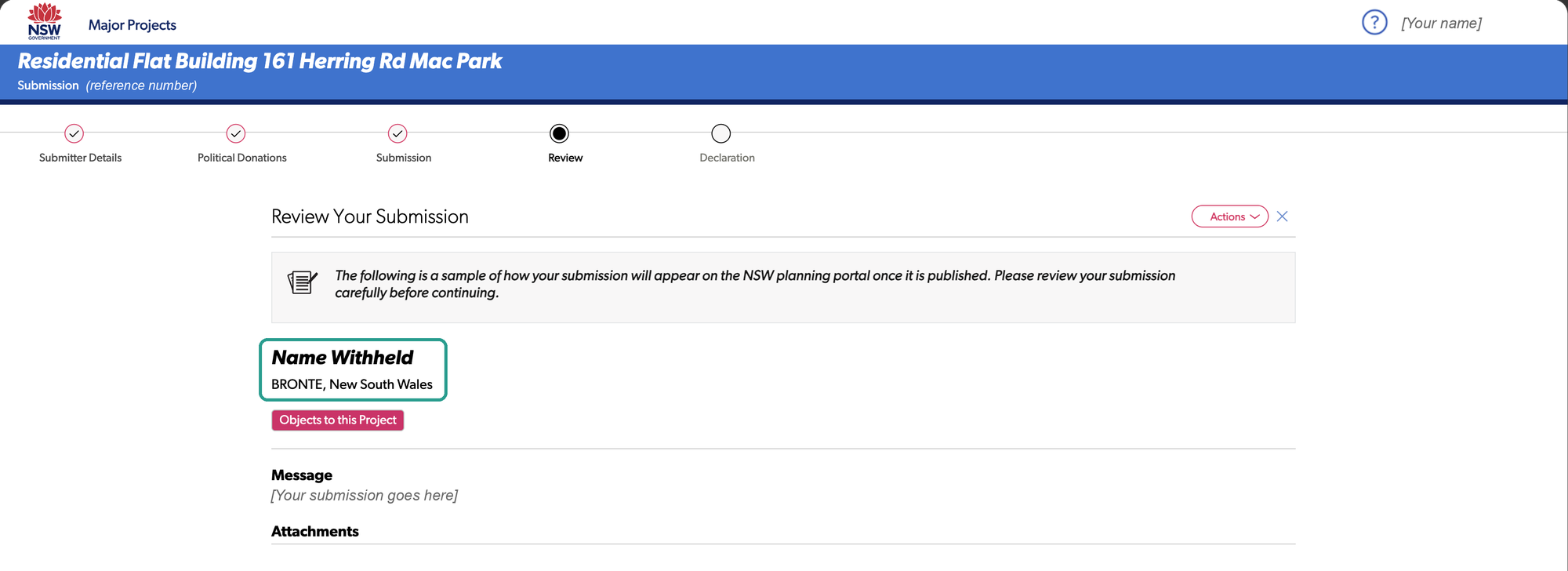
The Review screen, a sample of the published submission, with "Name Withheld, BRONTE, New South Wales" ringed, an "Objects to this Project" tag, and the message and attachments below.
The Review screen shows exactly what will be published.Screens from another project on exhibition. The Hewlett Street form is the same.
More

Your Portal account holds your full name and home address, and the form shows them for you to check. Your street address isn't published, unless it's in your submission, in an attachment or in a political donations disclosure. The form's Review screen shows exactly how your submission will appear once it's published.

The form also asks whether you've made a reportable political donation in the previous two years. Answer it accurately. If you have, you attach a disclosure statement, which is published with your name and address, and your name can't then be withheld. The Department's "Make a submission" page explains what counts.

Photos are published too. Leave out people's faces, and, if you've withheld your name, anything that shows which home is yours.

Lodge only on the NSW Planning Portal, at planningportal.nsw.gov.au. Nobody, including BCA, needs your Portal password.

7. What to do now

Nothing to lodge yet. "Notify me" and a Portal account don't lodge anything. They make sure you hear the day it opens.
  1. 1

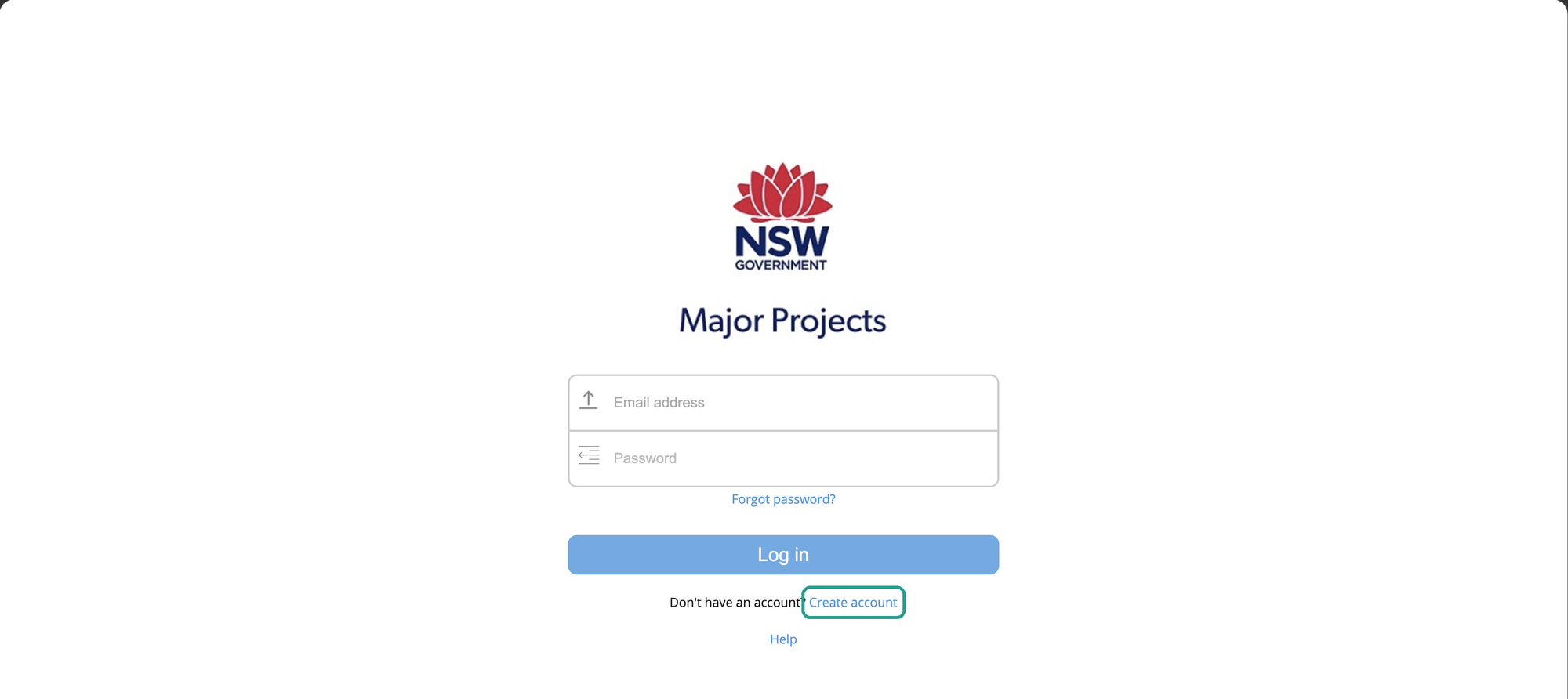
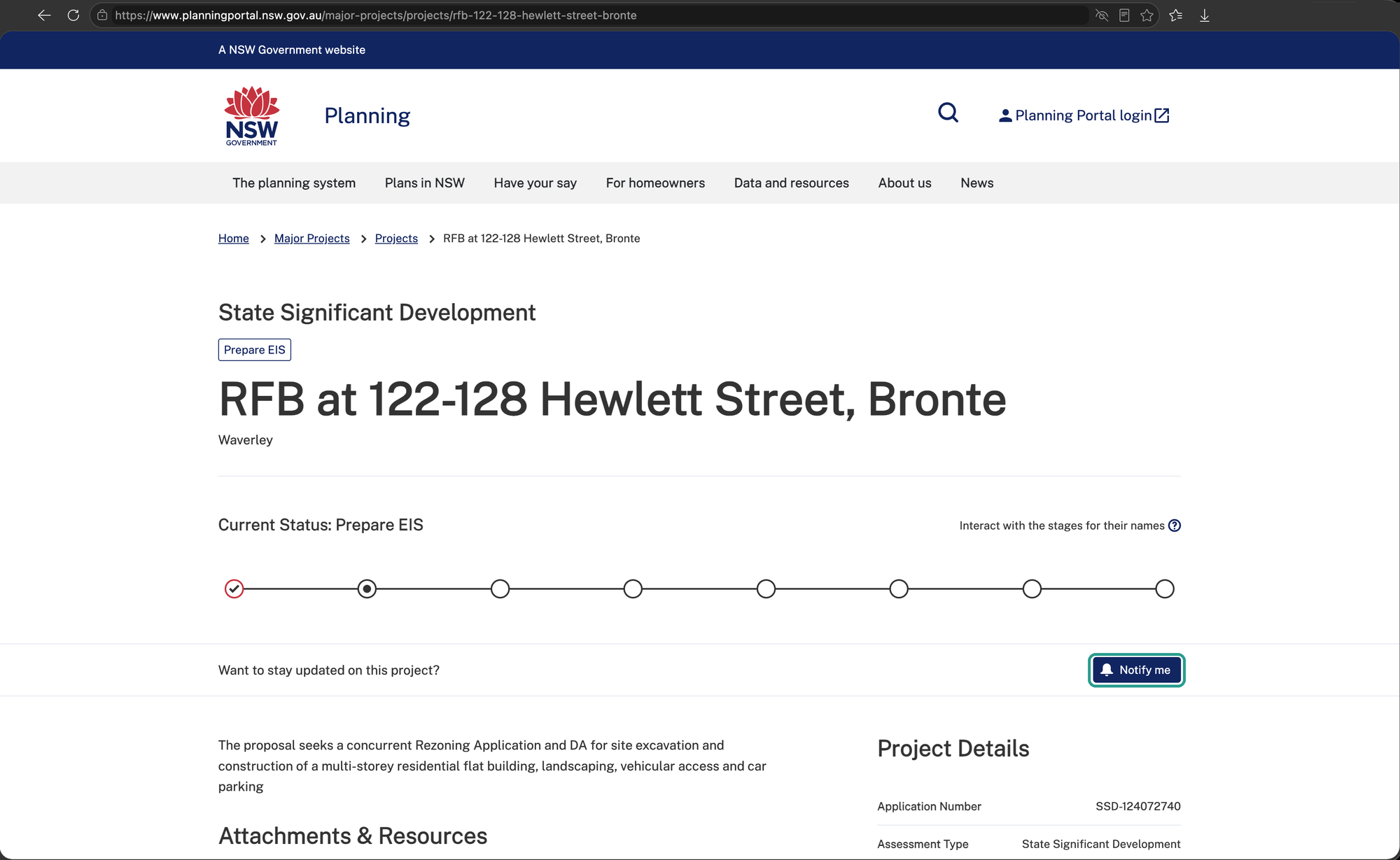
    Register. On the project page, click "Notify me" and log in. No account yet? Click "Create account" on the login screen and set up a NSW Planning Portal account. The Department will email you when the exhibition opens.

    The NSW Planning Portal page for RFB at 122-128 Hewlett Street, Bronte, status Prepare EIS, with the "Notify me" button ringed beside "Want to stay updated on this project?"
    On the project page, click "Notify me".
    The Major Projects login screen, with email and password boxes and a "Log in" button; the "Create account" link beneath is ringed.
    Log in, or click "Create account".
    A "Subscription Confirmation" screen reading "You have been successfully subscribed."
    You're on the Department's list for this project.
  2. 2

    Prepare. Draft the first three parts of your submission by the end of November, and gather your photos, noting where and when you took them.

  3. 3

    Spread the word. Tell your neighbours that each adult can make their own submission.

BCA will:

  • Email members the link the day exhibition opens, with reminders
  • Publish images showing the building's size from several places, once checked against the published plans
  • Share material from our experts' report with members, on request
  • Arrange time with a shadow consultant for the homes most affected

Not a member? Join for $10 a year at brontecommunityassociation.org.au to hear from us about everything to do with the project.

When it opens, you'll lodge on the NSW Planning Portal, not by email. It takes about ten minutes once your points are written. The steps, with pictures, are at brontecommunityassociation.org.au/submit.
More

If we can't reach you, we can't tell you when it opens, and fourteen days goes quickly. The Department's alert reaches everyone who clicks "Notify me"; BCA's email reaches our members.

The project page is planningportal.nsw.gov.au/major-projects/projects/rfb-122-128-hewlett-street-bronte. Once you see "You have been successfully subscribed", you're on the Department's list.

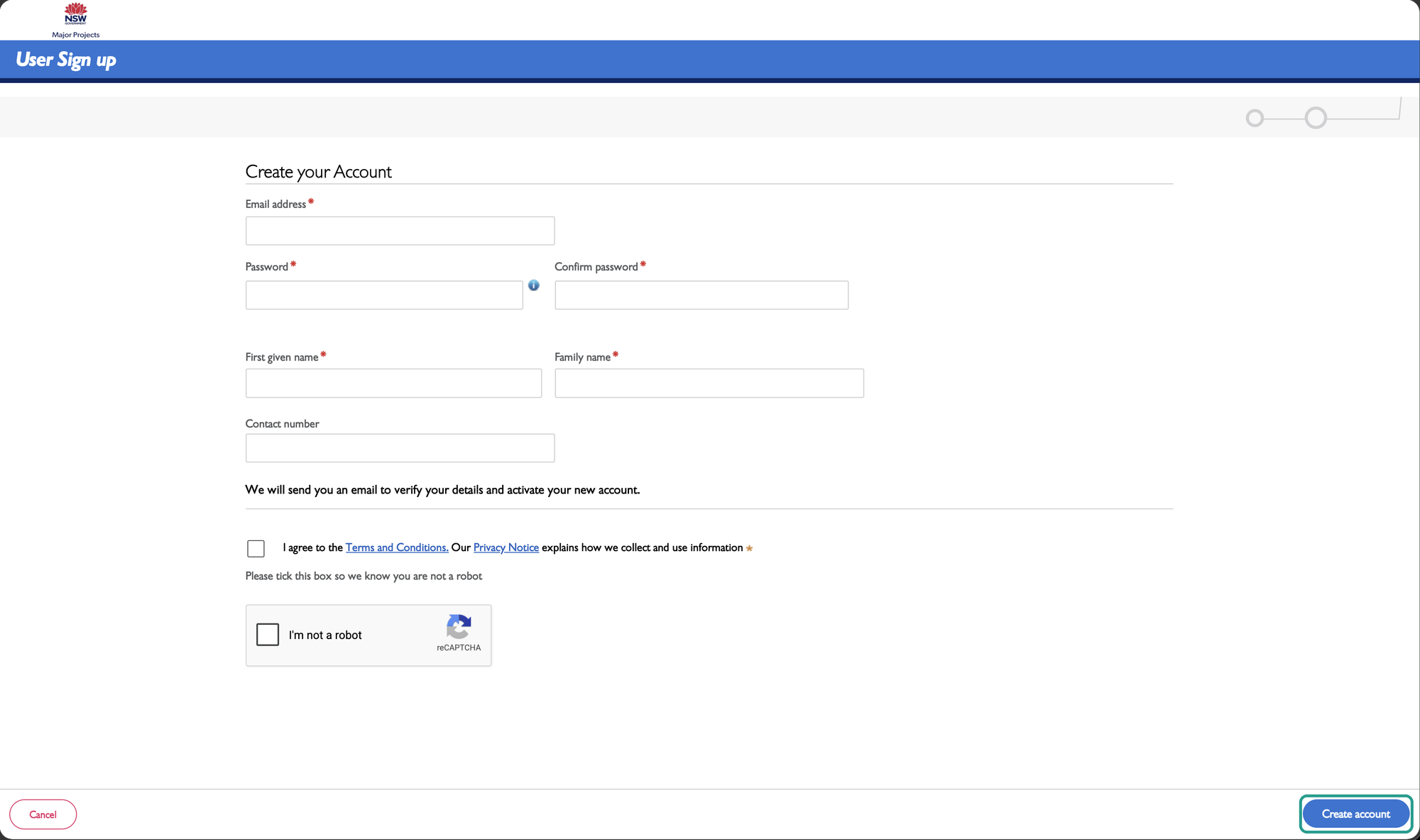
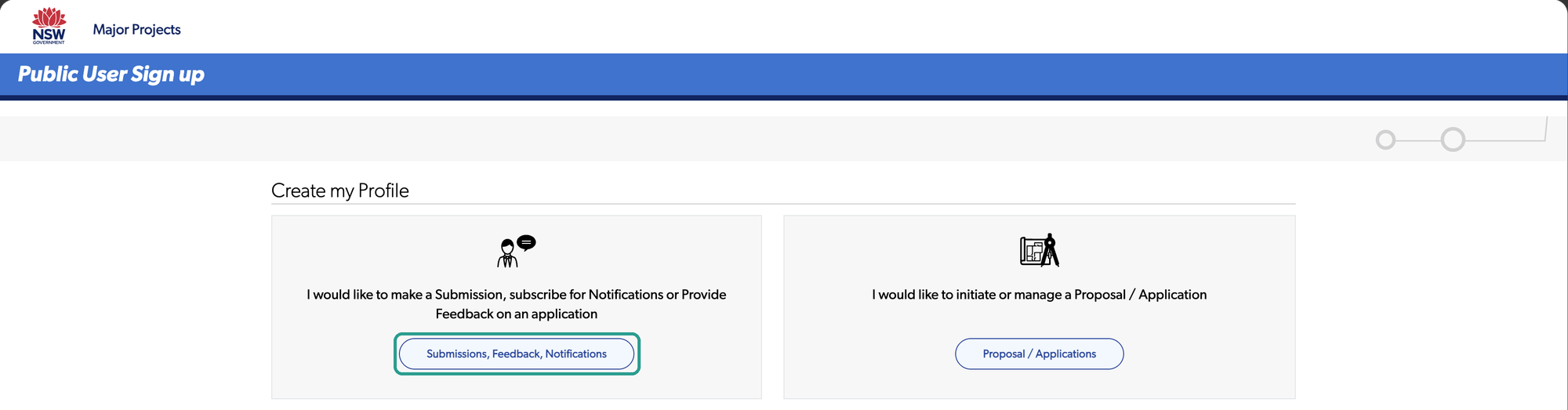
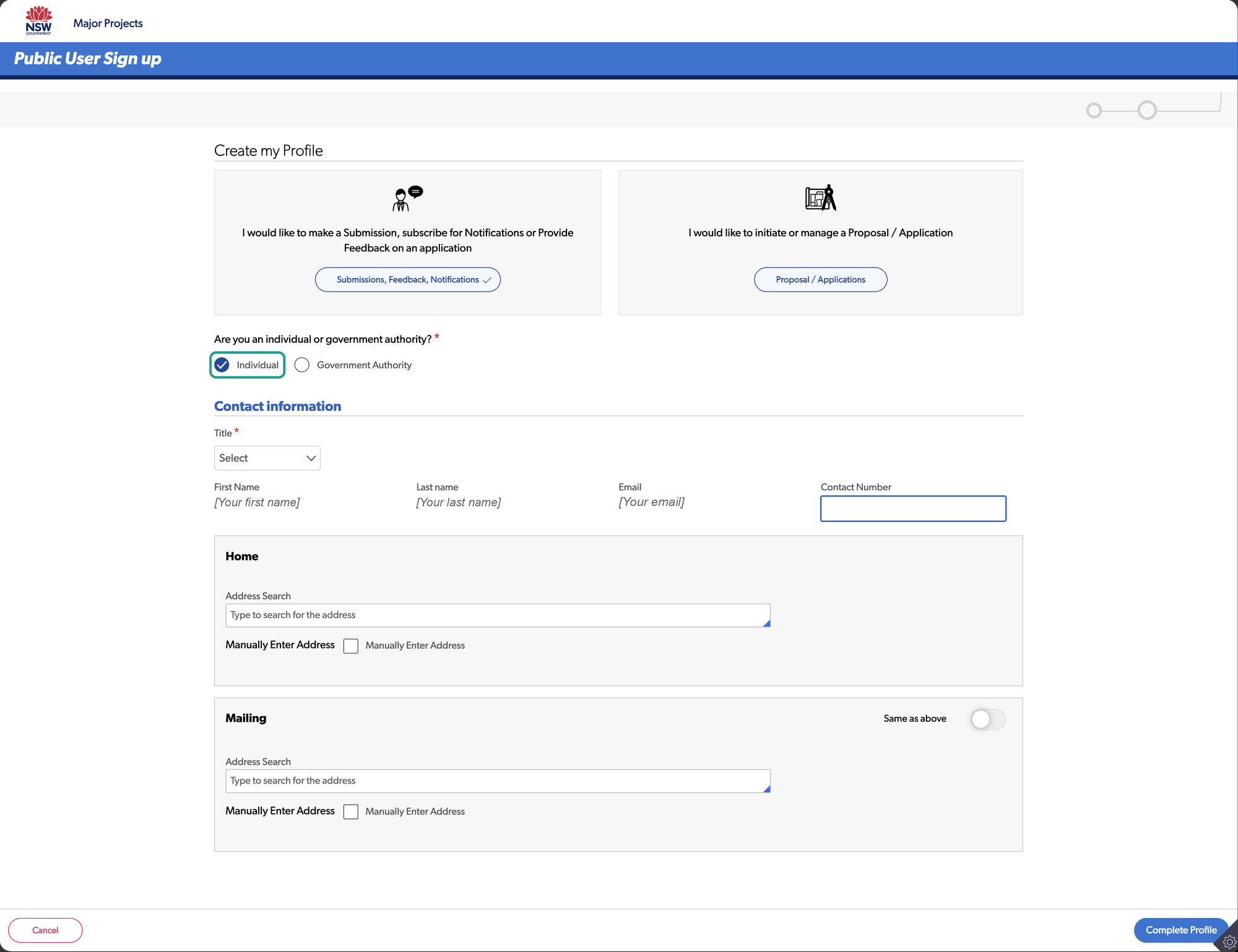
New account? Fill in your email, a password and your name. The Department emails you a link to verify it, which lasts 24 hours. The link opens "Create my Profile": choose "Submissions, Feedback, Notifications", then "Individual", add your title and home address, and click "Complete Profile". Then log in again, go back to the project page and click "Notify me".

The "Create your Account" form, asking for email address, password, first given name, family name and an optional contact number, with the "Create account" button ringed.
A new account needs your email, a password and your name.
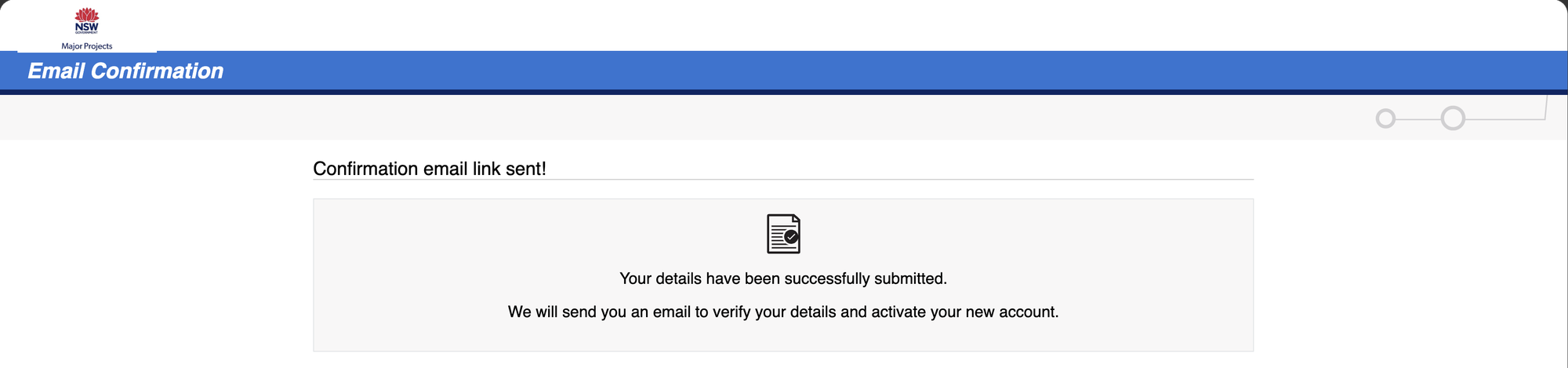
A confirmation screen reading "Confirmation email link sent! We will send you an email to verify your details and activate your new account."
The Department emails you a link to activate it.
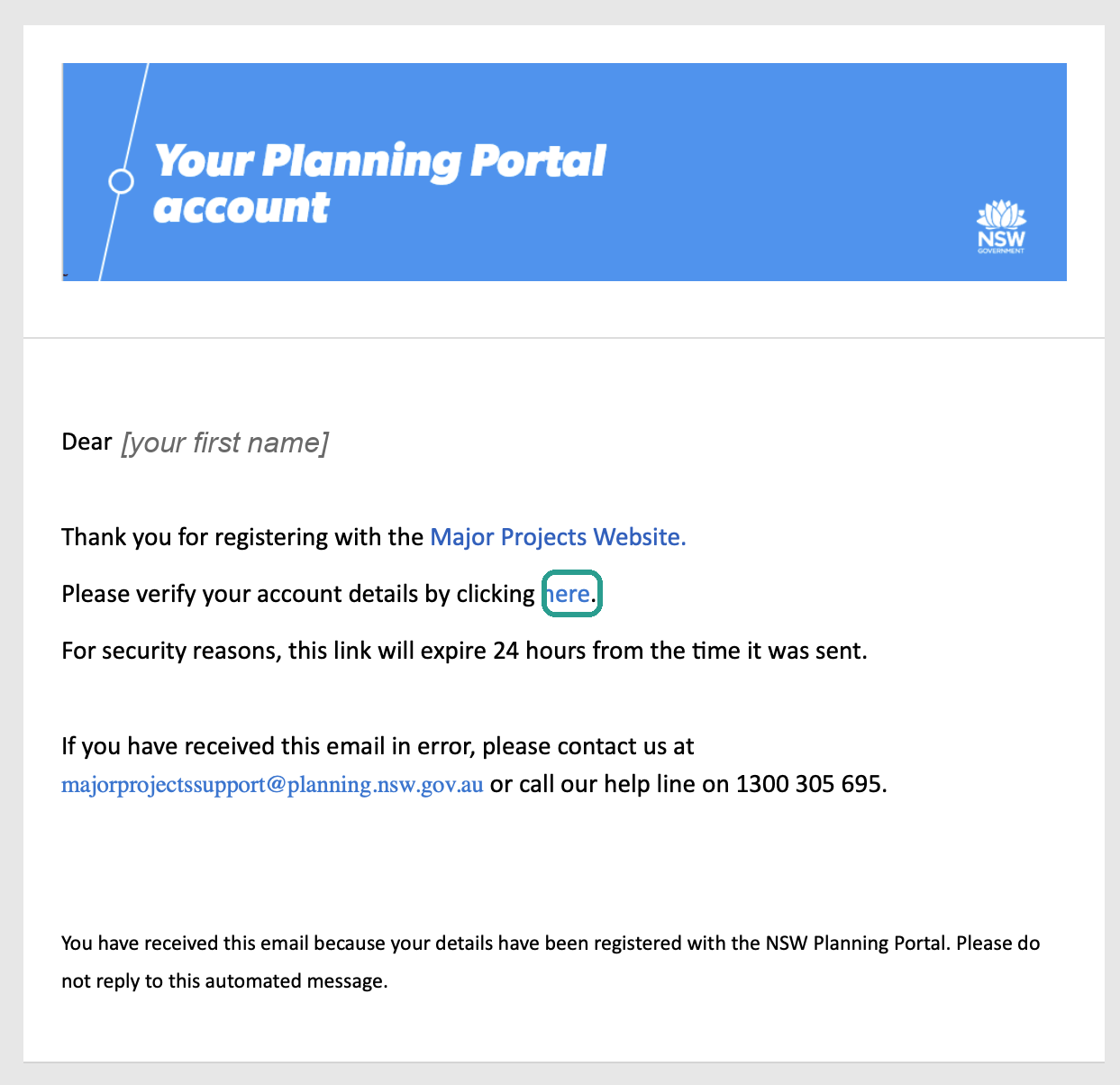
The Planning Portal's verification email, asking you to verify your account by clicking "here", which is ringed, and saying the link expires in 24 hours.
Click the link in the email within 24 hours.
The "Create my Profile" screen with two choices; the button "Submissions, Feedback, Notifications" is ringed.
Choose "Submissions, Feedback, Notifications".
The profile form with "Individual" ringed, then title, name, email, contact number, and home and mailing address searches.
Choose "Individual", add your title and home address, and click "Complete Profile".
A message reading "Your profile has now been created. You must login again to access your account." with an OK button.
Then log in again.